Manage All Your Clients' Links, QR Codes & Domains in One Place
Stop logging into dozens of separate accounts or paying steep per-seat software fees. Connect your clients' custom domains, organize campaigns into folders, create trackable QR codes, and export clean reports they will love.
Agency Features
Run Client Campaigns with Confidence
Everything you need to manage links, domains, and reports for multiple clients without the chaos.
Dedicated Client Folders
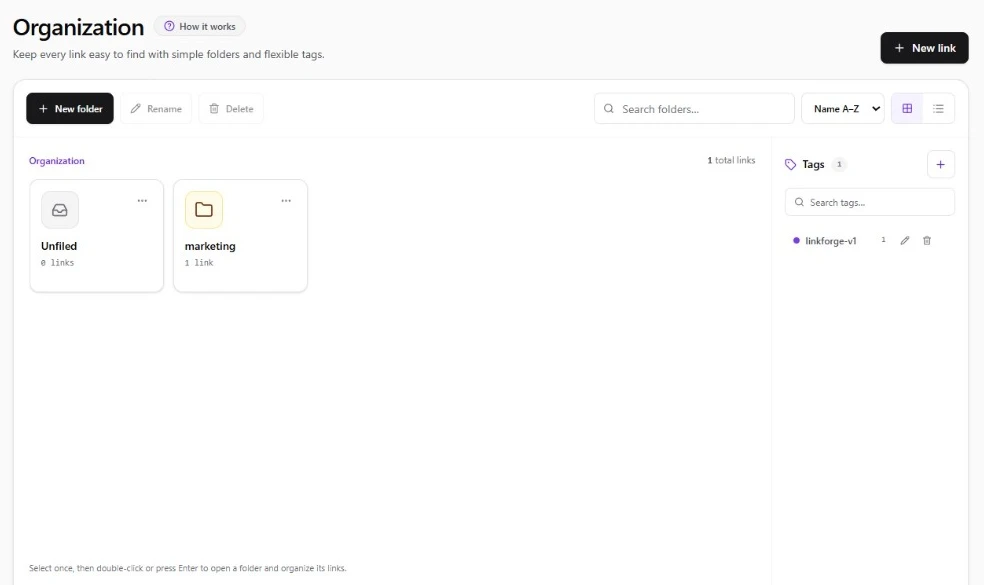
Keep links, custom domains, and tracking tags organized in separate folders for each client so campaigns never get mixed up.
Multi-Client Domains
Provision client short domains (`go.client.com`) with automatic CNAME verification, automated SSL, and custom root fallbacks.
Learn about custom domainsClient-Ready Exports
Export bot-filtered click metrics, location maps, device breakdowns, and conversion attribution data for monthly client reviews.
Read tracking guideAgency UTM Templates
Enforce strict naming conventions across all media buyers. Save reusable presets for Meta Ads, Google Ads, TikTok, and influencers.
Read UTM parameter guideVector QR for Print & OOH
Generate print-ready vector SVG dynamic QR codes with client brand logos and custom colors for billboards, flyers, and event booths.
Explore dynamic QR codesRole-Based Team Seats
Available on Business plans: invite media buyers, graphic designers, copywriters, and client observers with tailored access permissions per workspace.
Dedicated Client Folders & Multi-Tag Taxonomy
Keep every client brand, promotion, and seasonal campaign structured in dedicated folders with instant tag filtering.
Retainer Playbooks
4 High-Margin Agency Service Offerings
Expand your agency retainer value by delivering full-funnel link infrastructure and attribution as a premium service.
Omnichannel Performance Marketing Retainers
Paid Social, Search, & Programmatic Ads
Agencies managing Meta, Google, and TikTok ad spend need clean, unified attribution. LinkForge ensures every ad variant, sitelink, and campaign creative is tagged with uniform lowercase UTM taxonomy, preventing fragmented Google Analytics 4 reports and validating agency ad performance.
- Pre-configured client presets eliminate media buyer manual tagging errors
- Bot-filtered human clicks ensure clients only pay for verified engagement
Out-of-Home & Event Print Activations
Billboards, Trade Shows, Direct Mail & Packaging
Bridge physical client advertising with digital attribution. Deliver scalable vector SVG QR codes embedded with client brand logos for high-volume print runs. If landing page requirements change post-print, update the destination in LinkForge without costly reprints.
- Vector SVG exports maintain pristine sharpness at billboard scale
- Track scan volume by city, mobile operating system, and scan hour
Influencer & Creator Ambassador Campaigns
Creator Partnerships & Affiliate Roster Management
Managing 50+ influencer collaborations simultaneously often leads to broken tracking links. Agencies issue client-branded vanity URLs (e.g. brand.co/creator) with locked UTM tracking parameters, ensuring zero commission leakage and accurate payout reporting.
- Bulk generate creator links programmatically via LinkForge REST API
- Export segmented partner performance spreadsheets in one click
International Growth & Multi-Currency Clients
Cross-Border E-Commerce & App Growth
Direct international traffic with intelligent conditional rules. Route UK shoppers to UK Shopify stores, US shoppers to USD checkouts, and mobile app download campaigns to Apple App Store or Google Play automatically from a single branded short link.
- Zero latency penalty (<10ms edge rule evaluation worldwide)
- Guaranteed fallback URL ensures zero 404 dead-ends
Economic Advantage
Stop Paying $199+/mo per Client Account
Compare LinkForge agency economics with legacy link shortening providers.
| Agency Requirement | LinkForge | Bitly Enterprise | Generic Shorteners |
|---|---|---|---|
| Custom Brand Domains | 2 (Starter $9) / 5 (Pro $24) / 20 (Business $79) | 1 domain ($35/mo) · Enterprise for more | Not supported |
| Team Seat Management | Included on Business (10 seats included) | Expensive per-seat add-ons | Single login only |
| Dynamic Vector QR Codes (SVG) | Included with logo embedding & error correction | Separate Bitly QR product tier | Raster PNG only |
| Smart Geo & Device Routing | Included on Pro ($24) & Business ($79) | Enterprise only ($199+/mo) | Not supported |
| Bot Traffic Filtration | Included on all plans | Raw clicks (polluted by bots) | Basic counter only |
Ecosystem
Related Platform Capabilities & Guides
Discover connected tools, implementation playbooks, and comparisons to maximize your campaign performance.
Branded URL Shortener
Shorten links with custom domain slugs, SSL security, and edge redirect latency.
Custom Branded Domains
Connect your company domains with automated TLS certificates and DNS health checks.
Link Tracking & Analytics Guide
Best practices for measuring real human click engagement and conversion attribution.
Bitly Alternative Comparison
Why teams switch from Bitly's pricing tiers and ad-supported links to LinkForge.
FAQ
Frequently Asked Questions
Common questions about using LinkForge for marketing agency operations and client management.
Can we organize links into separate folders for different clients?
Yes. LinkForge supports dedicated client workspace folders with isolated link repositories, custom domains, and UTM tagging templates, allowing media buyers and account executives to manage dozens of client accounts without clutter or cross-brand confusion.
How do custom domains work across multiple client accounts?
Each agency workspace can connect multiple custom domains based on plan tier (2 on Starter, 5 on Pro, 20 on Business). You can connect dedicated branded domains like `go.nikecampaign.com` and `link.redbullpromo.com` for each client, and organize all campaign links into client-specific folders.
Can we export campaign performance reports for client meetings?
Yes. You can export bot-filtered click metrics, geographic heatmaps, device breakdowns, and conversion attribution data as clean CSV files ready for Google Sheets, Tableau, or client slide decks.
Can we invite clients as read-only viewers to their specific campaigns?
Yes. Business workspaces include multi-seat team governance, allowing you to invite colleagues and client stakeholders with tailored access permissions without exposing global agency billing. Starter and Pro plans are designed for focused single-operator or small agency team workflows.
How does LinkForge prevent bot clicks from skewing client reporting?
LinkForge automatically filters web scrapers, preview crawlers (from Slack, iMessage, and Twitter), and search indexers from campaign metrics. Your agency presents verified, human-only engagement data to clients, preserving your agency's reporting integrity.
What happens to client links if a client pauses their retainer?
Client links remain active and operational on your workspace. You can pause or archive campaigns, update destination URLs to fallback pages, or reactivate links anytime without losing historic analytics data.
Can we generate links and QR codes programmatically for large influencer rosters?
Yes. Our developer REST API allows your team to generate hundreds of tagged vanity URLs and vector SVG QR codes automatically from Airtable, Google Sheets, or internal CRM systems in seconds.
Power Your Agency Link Operations with LinkForge
Consolidate client campaigns, connect branded domains, and deliver clean attribution reporting.